
Booking Reports give you instant access to Sedgwick County jail booking reports, including inmate name, booking number, arrest date, and charges. By entering a name or date on the official Sedgwick County search portal, you can view current booking reports, bond amounts, and detention facility details. The system updates daily, so recent arrests appear quickly, helping families and attorneys confirm custody status and upcoming court case numbers without waiting for paperwork.
When you need a booking record lookup, start with the online inmate search at the Sedgwick County Adult Detention Facility. The portal lets you filter by booking date, agency, or offense information, showing a clear booking log and inmate roster. If a report is missing, verify the spelling, check for system update delays, or request a public records copy from the sheriff’s office to ensure you have the correct booking history.
How to Search Booking Reports
Booking reports are jail intake records created when the Sedgwick County Sheriff’s Office admits a person to the Sedgwick County Adult Detention Facility. A booking report search shows the details tied to that intake, including the inmate name, booking number, arrest date, alleged charges, listed bond, court case number, and current custody status. You can also explore booking releases history through available county records. The main purpose is to confirm whether a person is being held and to connect that custody event to the court case opened for the charge. Each entry covers one admission to jail, so a person with several stays has several booking numbers and a longer booking history.
Official Search Portal: https://ssc.sedgwickcounty.org/InmateSearch/
Steps to Search
- Open the official Sedgwick County inmate search portal and enter the person’s last name in the name field. Add a first name or middle initial if the form provides a space for it.
- Add other search terms where the form allows them, such as a date of birth, booking number, booking date range, arresting agency, or offense keyword, to narrow the returned list.
- Run the search and read the result list before opening anything. Compare the booking number, booking date and time, and charge description for each entry.
- Open the matching entry and review the custody status, bond amount, court, and case number fields. Write down the booking number, since it is the reference for later requests and calls.
- Contact the detention facility or the Sheriff’s Office records unit for a document when you need a dated copy or a certified record instead of an online listing.
What Sedgwick County Booking Reports Contain
Every Sedgwick County booking report centers on a single intake event. It links the person named in the record to the facility holding them, the offense written at intake, the bond posted in the jail system, and the court case connected to that charge. The entry is created by jail staff as the person is processed, which is why the booking date and time can differ from the arrest date and time by several hours. Records support families checking on a relative, attorneys confirming a custody fact, and members of the public who need the intake facts rather than a secondhand account.
The custody fields published for the Sedgwick County inmate roster cover the items below.
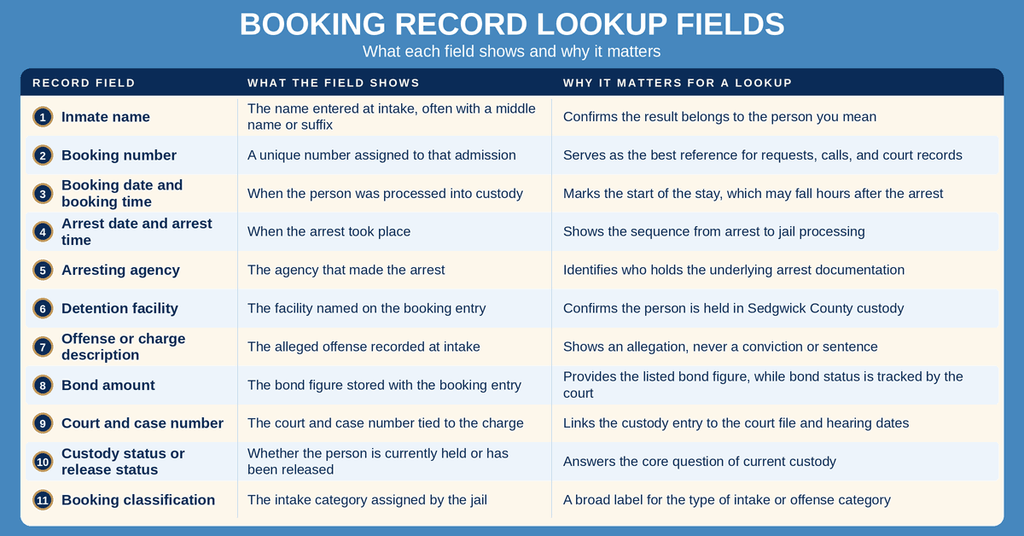
Some fields sit blank on certain entries, and some details change after intake as case facts are added or a person moves to another facility. A booking report captures what the jail recorded at admission. It does not confirm that every listed charge was filed in court, and it does not show how a case ended. For filings, appearances, and rulings, use the court record covered in the next section. The charges on a booking entry also describe alleged conduct only, so a booking record never proves guilt.
Booking Reports and Court Case Records
People often treat a booking report and a court case record as the same file. They come from separate offices and answer separate questions. A booking report covers the custody event: the arrest, the intake, the alleged offenses, the bond listed at booking, and where the person is held. A court case record covers the legal case: the charges filed, court appearances, docket filings, and the current status of that case before the judge.
Kansas does not publish a single statewide public arrest-history database for adults. Arrest details stay with the agency that made the arrest, custody details stay with the jail, and the case file stays with the district court. That split explains why one arrest can produce several separate records, each held by a different office, and why a booking report can carry a case number that leads to a court file you must look up on its own.
Different records provide different details about an arrest or booking. The jail booking report, maintained by the Sedgwick County Sheriff’s Office and Adult Detention Facility, provides custody status, booking numbers, intake details, bond information, and listed alleged offenses. District court case records provide filed charges, court appearances, docket entries, case status, and case numbers. Arrest and incident reports are maintained by the agency that made the arrest and may include the arrest time, location, and related details. For an official copy of jail intake records, contact the Sheriff’s Office records unit. Always consult the appropriate agency or court to verify the information.
For the court side, the Kansas Judicial Center eCourt case search at kscourts.org accepts party names and case numbers for Kansas district courts. Search the case number shown on a booking entry to confirm that a charge was filed and to see the next scheduled court date. Court dockets move on their own schedule, so a case number appearing on a booking entry does not mean the court file was updated at the same moment as the jail roster. A bond figure recorded at intake can also change after the court acts on a bond motion, and that change may appear in the court file before it appears in the jail listing.
Obtaining Official Booking Records and Documents
The online inmate search answers a live custody question. It does not produce a sealed document bearing a signature, and a printout of a roster entry is not a certified record. Employers, licensing boards, courts, and some legal filings ask for a dated copy of the intake report, and some ask for an official certification of that copy. Those documents come from a records request to the Sedgwick County Sheriff’s Office rather than from the search screen.
Decide which option fits your purpose before ordering anything. A certified copy takes more work than a standard copy, and a request packed with records you do not need can cost more and take longer to fill. If your purpose is simple custody confirmation, the online result answers it at no cost.
Requesting Public Records from the Sedgwick County Sheriff’s Office
Sedgwick County answers records requests under the Kansas Open Records Act, K.S.A. 42-256 and the statutes that follow it. That law sets who must respond to a request, what an agency must send, and how long the agency has to answer. The Sheriff’s Office handles requests for jail records, including booking and custody records for the Sedgwick County Adult Detention Facility. Reach the records unit through the Sheriff’s Office pages on the county site at sedgwickcounty.org, and describe the records you want in plain words so staff can match your request to the correct booking entries.
Write the request so it can be answered without a follow-up call. Give the full legal name of the person, the date of birth, and the booking number or court case number if you hold one. Include the dates involved, the arrest agency, and the city where the arrest happened when you know them. State which records you want, such as the full booking report or the custody history for a date range, and give one clear delivery method with a phone number for questions. Keep a copy of everything you send so you can show the date of your request if a response deadline passes.
Not every detail on an intake record can be released. Kansas law protects juvenile records and shields certain victim details in particular cases. Medical details, material tied to an open investigation, and other records the agency may withhold under state or federal law can be removed before a copy leaves the office. Individuals can also check 24 hour booking legal records to verify relevant details. A request can still produce the custody facts after those lines are taken out. Ask that redactions be marked, so you can tell a withheld line apart from a field that was never filled in.
Record Request Fees and Processing Timelines
The online inmate search carries no charge. A written request may include fees for copying, handling, and certification, set by the county’s fee schedule, and that schedule can change over time. Ask for the current amount before placing an order, ask which payment methods the office accepts, and ask what happens to a fee if the search produces no matching record. Certified copies cost more than standard copies, so ask for a price on each item you want rather than one price for the entire request.
The Kansas Open Records Act gives an agency 45 days from receipt of a request to respond. If the agency passes that window, the request is treated as denied and the requester may appeal to the Kansas Open Government Commission. Those 45 days limit how long the agency can sit on an answer; they do not promise that records arrive on day 45. A request built around a name, a date range, and a booking number is far easier to fill than one built on a name alone, and that difference often shortens the work behind the response.
Ask for a status update if the response window passes without an answer, and keep your request on file in case the office needs to confirm a detail. A records unit can also confirm whether a booking falls outside the active roster and exists only as a historical record. For a custody question that cannot wait on paperwork, call the detention facility using the number listed at the end of this page.
Record Accuracy and Search Troubleshooting
Most problems with a booking report search trace back to a name that does not match, a date range that ends too soon, or a record that has not posted yet. The booking data comes from a live jail management system, so an entry reflects what staff entered and confirmed at intake. Any mismatch can be checked against the booking number, arrest date, and charge description, and the records unit can correct errors it finds in the files it maintains.
Verifying a Person Match and Identifying Details
A name on its own rarely proves a match. Shared names point to more than one person, and one person can have multiple stays over the years. Treat a result as a confirmed match only after several details line up: the full name, the date of birth if you have it, the booking number, the booking date, the arresting agency, and the charge description. A court case number shown on the booking entry gives you a second check, since a case number belongs to one filed case.
When multiple results share a name, read each entry’s booking date, arrest agency, and offense before choosing one. Narrow the search by adding a date range or a booking number rather than accepting the first entry that appears. When one person has more than one booking, each booking number describes a separate intake, so a records request naming several booking numbers can cover the full booking history in a single submission.
If two entries look nearly identical, compare the case number and the arrest agency for each. When the details still match and you need certainty, ask the records unit to confirm which booking belongs to the person you mean. The detention facility can also verify whether a named person is currently held, which helps when the intake date on a booking entry and the date you have in hand do not agree.
System Update Delays for Recent Bookings
An arrest and a booking happen at different moments. A person can be arrested, transported, and processed for a few hours before the intake entry posts, and the public roster can trail the actual intake by more time than that. The roster is refreshed on a recurring schedule, so the newest booking may appear a short while after the arrest. Give a recent arrest some time before treating an empty result list as a problem, and search again with a wider date range instead of one narrow day.
Transfers and releases work in the opposite direction. When a person leaves the facility, the active roster changes, and older entries can drop out of the live search even though the booking still exists in the county’s records. A search that returns nothing for someone arrested days earlier may point to a release rather than a missing file. Asking the Sheriff’s Office for the historical booking record is the way to confirm what happened during a stay that has ended, and that request reaches records the public roster no longer shows.
Spelling differences explain many other gaps in a name search. The roster may carry a legal name, a middle name, or a suffix that differs from the name you know. Trying the full legal name, the name without a middle initial, and the name with a suffix can surface an entry that a single spelling missed.
What to Do If a Booking Report Is Missing or Unlisted
Work through the steps below before treating a booking report as missing. Each one takes a minute and rules out the most common causes of an empty result list.
- Confirm the spelling of the last name, first name, and any middle name or suffix used at booking.
- Widen the booking date range, and run the search with the arrest date as well as the booking date.
- Search by booking number or court case number if either one appears on paperwork you already hold.
- Remove the agency filter, since the booking may have been handled by an agency other than the one you expect.
- Run the search again after a delay for a recent arrest, then confirm custody by phone using the facility number listed below.
- Submit a public records request to the Sheriff’s Office for a named date range, asking for the historical booking report and the custody history.
If a report appears with the wrong name, charge, or booking number, save a copy of the page that shows the error and send it to the records unit with the booking number attached. Ask for a correction or for the correct copy in writing, and keep a dated record of that request. Public records requests also cover historical bookings, so a person released years ago can have a booking record on file even when the live search shows nothing at all.
Contact Information
Use the details below for facility questions and same-day custody checks. For a written copy of a booking report, send a public records request to the Sedgwick County Sheriff’s Office records unit and include the booking number or the date range you need. This page was last reviewed on October 29, 2026.
Frequently Asked Questions
Find quick answers about accessing and understanding Sedgwick County booking reports, including how to search, what details are shown, and where to get help.
How can I search Sedgwick County booking reports?
Visit the official Sedgwick County Inmate Search portal at https://ssc.sedgwickcounty.org/InmateSearch/. Enter the inmate’s name, booking number, or date range in the search fields. The system returns matching booking reports that include arrest date, charges, bond amount, and current custody status. Results update continuously, so you can see new entries as they are entered. If you need assistance, call the detention facility at (316) 660-5245 during any hour, as the office operates 24/7.
What info appears on a jail booking record?
A jail booking record lists the inmate’s full name, booking number, and booking date and time. It also shows the arrest date, the agency that made the arrest, and a summary of alleged charges. Bond or bail amount, the associated court case number, and the current custody classification are included. The record may note release status if the inmate has been discharged. All fields are drawn from the intake paperwork completed by the Sedgwick County Sheriff’s Office at the Adult Detention Facility.
Where can I find recent booking reports online?
Recent booking reports are available through the same online search portal used for all booking inquiries. After entering a date range, the system displays the latest entries for the past 24 hours, often labeled as “daily booking reports.” The website refreshes automatically, so you see the most current information without needing to reload. For a broader view, you can also check the public booking log on the Sedgwick County Sheriff’s Office website, which archives daily reports for public access.
How do I look up a booking number by inmate name?
Start at the Sedgwick County Inmate Search page and type the inmate’s first and last name into the name fields. The results list each matching individual with their unique booking number displayed beside the name. Click the record to view full details, including booking date, charges, and custody status. If multiple matches appear, refine the search with additional information such as birth date or booking date to isolate the correct record.
Who to contact for missing or delayed booking records?
If a booking record does not appear after 24 hours, call the Adult Detention Facility’s information line at (316) 660-5245. Explain the inmate’s name, booking date, and the issue you are experiencing. Staff can verify whether the record is still being processed or if an error occurred. They may also guide you to the appropriate department for formal record requests or corrections, ensuring you receive the most accurate and up‑to‑date information.